Today, I would like to give you simple tip to convert list of values seperated by comma stored in a column into Multiple Rows in SQL Server.
declare @String varchar(MAX)
set @String = '100,200,250,300,350,450,500'
set @String =','+ @String + ','
SELECT REPLACE(Val_Column,',','')
FROM
(
select
substring(@String,number,CHARINDEX(',',@String,number+1)-number) As Val_Column
from
master..spt_values
where number < LEN(@String)
and type = 'P'
) C
where Val_Column like ',%'
Output
--------------------------------------
100
200
250
300
350
450
500
(7 row(s) affected)
Tuesday, February 2, 2010
Convert list of values seperated by comma stored in a column into Multiple Rows in SQL Server


Monday, February 1, 2010
Split Full Name into First Name, Middle Name, Last Name in SQL Server using PARSENAME function
In this post i would like to show you a simple technique to split the full name. There are various techniques available to do the same using LEFT, RIGHT,SUBSTRING, CHARINDEX functions.
DECLARE @SQLVariable VARCHAR(100);
SET @SQLVariable = 'Vijaya.Krishna.Kadiyala.SQL Server';
select PARSENAME(@SQLVariable,1) AS Technical_Skill;
select PARSENAME(@SQLVariable,2) AS LAST_NAME;
select PARSENAME(@SQLVariable,3) AS MIDDLE_NAME;
select PARSENAME(@SQLVariable,4) AS FIRST_NAME;
Output:
Technical_Skill
-----------------
SQL Server
(1 row(s) affected)
LAST_NAME
-------------------
Kadiyala
(1 row(s) affected)
MIDDLE_NAME
-------------------
Krishna
(1 row(s) affected)
FIRST_NAME
-------------------
Vijaya
(1 row(s) affected)
Reference : Vijaya Kadiyala (www.DotNetVJ.com)
Thursday, January 28, 2010
Convert Number to Varchar in SQL Server using CAST or CONVERT or STR or Any other String Functions
Recently i started to explpore "ways" in SQL Server.
Ways in SQL Server:
===============
Implementation of NOT IN operator with out using NOT IN....
TOP 5 ways to delete Duplicate Records in a Table
In the same series today i would like to show you different ways to convert number to varchar.
Using CAST Function:
=================
SELECT CAST(YEAR(GETDATE()) AS VARCHAR)
Output:
----
2010
(1 row(s) affected)
Using CONVERT Function:
======================
SELECT CONVERT(VARCHAR(4),YEAR(GETDATE()))
Output:
----
2010
(1 row(s) affected)
Using STR String Function:
=====================
SELECT STR(YEAR(GETDATE()))
Output:
----
2010
(1 row(s) affected)
Using RTRIM or LTRIM Functions:
=============================
SELECT RTRIM(YEAR(GETDATE()))
Output:
----
2010
(1 row(s) affected)
When you apply any string functions on the numbers then by default SQL Server converts them to string data type.
Please let me know if you have any other ways.....
Related Articles:
============
String Functions in SQL Server Part 1
String Functions in SQL Server -- Final Part
Wednesday, January 27, 2010
Search For Columns in SQL Server
In this post i would like to show you various methods to search for columns in SQL Server metadata tables.
Method 1:
========SELECT TABLE_SCHEMA,
TABLE_NAME,
COLUMN_NAME
FROM
INFORMATION_SCHEMA.COLUMNS
WHERE COLUMN_NAME LIKE
'%emp%';
Method 2:
========SELECT OBJECT_SCHEMA_NAME(object_id) AS SCHEMANAME,
OBJECT_NAME(object_id) OBJECTNAME,
name as column_name
FROM
sys.columns
WHERE name LIKE '%emp%';
I normally use Method 1, to find the information. Please let me know if you have any other approach.....
Tuesday, January 26, 2010
Is Your MONEY Safe in SQL Server
In this post i would like to share my experience with you on MONEY data type in SQL Server .
Let’s looks at one example where MONEY data type will round numbers.
Usage of MONEY data type in storing amounts
DECLARE @Money_Amt1 MONEY, @Money_Amt2 MONEY
SET @Money_Amt1 = 100100.1234567;
SET @Money_Amt2 = 100100.1234;
SELECT @Money_Amt1 AS Money_Amt1,
@Money_Amt2 AS Money_Amt2;

As you can see Money data type can hold only up to 4 digits after the decimal. If you are trying to assign a number whose scale is more than 4 digits, then money data type rounds the number, in which case over the course of the time you will accumulate lot of in correct amounts. So you need to make right decision in choosing the right data type for your data.
FYI: This is not a bug neither this is the limitation.
Let’s look at one example where you want to multiply two MONEY data type variables .
Usage of MONEY data type in Multiplication
DECLARE @Your_Money MONEY, @Currency_Conversion_Rate MONEY;
SET @Your_Money = 12.2345;
SET @Currency_Conversion_Rate = 18.7686;
SELECT (@Your_Money * @Currency_Conversion_Rate) AS Col1,
(@Your_Money * 1.0 * @Currency_Conversion_Rate) AS Col2;
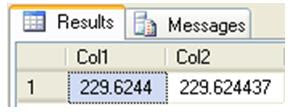
As you can see in the above query, I declared two variables. The result of the multiplication or division of two money data type is always money. As discussed previously money data type can hold only 4 digits after the decimal and if it is anything more than that it tries to round to the nearest number. As you can see in the Col1, you don’t see the accurate results of the multiplication operation and whereas in the Col2 by multiplying with 1.0, basically SQL Server is converting into numeric.
Wednesday, January 20, 2010
Order By Clause is not accepting alias Name in SQL Server
Today, i came across a strange behaviour of ORDER BY clause in SQL Server. In one of my post i mentioned that ORDER BY clause is final step in the SQL Query if you don't have TOP keyword in the query.
Lets look at the below example:
SELECT
BusinessEntityID,
LoginID,
HireDate,
GETDATE() AS Current_Dt
FROM HumanResources.Employee
ORDER BY Current_Dt
In this query i have an alias name in the ORDER BY Clause and SQL Server executes the query with out any errors as shown below:
Now If i use any functions on the alias column in the ORDER BY clause, it comes out with errors:
SELECT BusinessEntityID,
LoginID,
HireDate,
GETDATE() AS Current_Dt
FROM HumanResources.Employee
ORDER BY ABS(DATEDIFF(DAY,Current_Dt,HireDate));
Do let me know if you have any answer to this question....
Reference : Vijaya Kadiyala (www.DotNetVJ.com)
Subscribe to:
Posts (Atom)